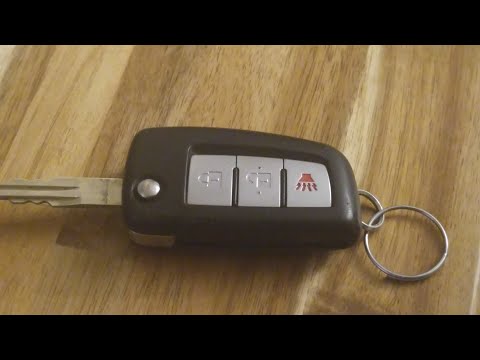
Nissan Rogue Key Fob Battery Replacement

2008-2025 Models

This vehicle has multiple key fob types. Select your key below.
Most Common

Remote Head Key
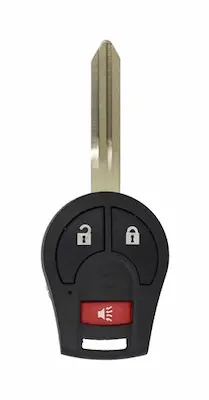
2008-2025 Nissan Rogue Remote Head Key
Battery Type
CR2016
Buy CR2016 on Amazon
✓ OEM Compatible
✓ Free Prime Shipping
Nissan Rogue Remote Head Key Battery Replacement Video
FCC ID: CWTWB1U751, X32-NSHKG020
Replacement Steps for Remote Head Key
Remove the Screw: On the back of the key fob, use your Phillips screwdriver to remove the small screw. Set it aside carefully so you don't lose it Open the Casing: Locate the tiny slot on the side of the fob. Insert your flat-blade screwdriver into the slot and give it a twist to separate the two halves Replace the Battery: Use a small tool (like your Phillips screwdriver) to wedge out the old battery. Insert the new 1620 battery with the positive (+) side facing downward Reassemble: Squeeze the two halves of the fob back together firmly until they click Secure the Screw: Put the screw back into the hole on the back and tighten it. Your key fob is now ready to use and does not require reprogramming
Alternative

Remote Head Key

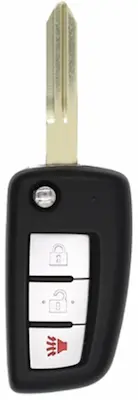
2008-2025 Nissan Rogue Remote Head Key
Battery Type
CR2032
Buy CR2032 on Amazon
✓ OEM Compatible
✓ Free Prime Shipping
Nissan Rogue Remote Head Key Battery Replacement Video
FCC ID: CWTWB1G767
Replacement Steps for Remote Head Key
Open the Fob: Locate the small slot on the back end of the key fob. Insert your flat-blade screwdriver into this slot and twist until you hear a cracking sound, which indicates the casing is separating Remove the Old Battery: Once the fob is open, use the screwdriver to gently pop the old battery out of its housing Insert the New Battery: Place the new CR2032 battery into the fob with the positive (+) side facing down, as indicated inside the casing Reassemble the Fob: Align the two halves of the fob. It is recommended to seat the bottom portion first, then snap the top together. Give it a firm squeeze until it clicks back into place (note that it may require some force to close fully)
Alternative

Smart Key Fob

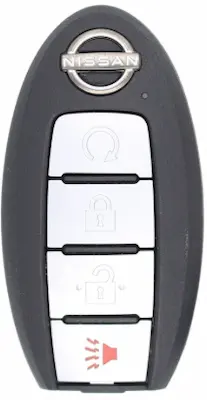
2008-2025 Nissan Rogue Smart Key Fob
Battery Type
CR2032
Buy CR2032 on Amazon
✓ OEM Compatible
✓ Free Prime Shipping
Nissan Rogue Smart Key Fob Battery Replacement Video
FCC ID: CWTWBU729, KR5S180144106, KR5S180144106, KR5TXN4, KR5TXN1, KR5TXN3
Replacement Steps for Smart Key Fob
Remove the Emergency Key: Slide the release button on the back of the fob and pull out the metal spare key Open the Case: Insert your pry tool or screwdriver into the small notch where the two halves of the fob meet. Gently pry the casing apart until the two halves separate Remove the Old Battery: Use the tip of your metal spare key to gently pop the old battery out of its housing Insert the New Battery: Place the new CR2032 battery into the slot with the lettering/positive (+) side facing down [00:40]. The internal spring should hold it in place Reassemble the Fob: Align the top and bottom halves of the casing. Press them together firmly until you hear them snap into place all the way around Replace the Key: Slide the metal emergency key back into the fob. If the latch doesn't click automatically, you may need to push it down manually

Frequently Asked Questions

What battery does a Nissan Rogue key fob use?

The 2008-2025 Nissan Rogue key fob uses a CR2016 3-volt lithium coin battery. This is a standard battery available at most grocery stores, pharmacies, and online retailers.

How do I know if my Nissan Rogue key fob battery is dying?

Signs your Nissan Rogue key fob battery is dying include: reduced range (having to get closer to unlock), intermittent button response, delayed unlocking, the low battery warning on your dashboard, or buttons requiring multiple presses to work.

How long does a Nissan Rogue key fob battery last?

A Nissan Rogue key fob battery typically lasts 2-4 years depending on usage. Frequent use, extreme temperatures, and proximity to electronic devices can shorten battery life.

Can I replace my Nissan Rogue key fob battery myself?

Yes, replacing a Nissan Rogue key fob battery is a simple DIY task that takes under 5 minutes. You only need a new CR2016 battery and optionally a small flathead screwdriver. No dealer visit or programming is required.

Do I need to reprogram my key fob after replacing the battery?

No, you do not need to reprogram your Nissan Rogue key fob after replacing the battery. The fob retains its programming during battery changes. Simply insert the new battery and test the buttons.

Where can I buy a CR2016 battery?

CR2016 batteries are available at Walmart, Target, CVS, Walgreens, Amazon, auto parts stores like AutoZone and O'Reilly, and most grocery stores. They typically cost $6-12 for a 2-pack.